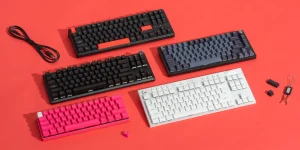
A mechanical gaming keyboard uses individual spring-loaded physical switches under each key, delivering faster actuation, tactile feedback, and significantly greater durability than the rubber-dome membrane keyboards found in most office setups [7]. For competitive gamers, content creators, and heavy typists across the United States, this technology has become the de facto standard — and the category now spans budget boards under $40 to premium enthusiast builds exceeding $300.
This guide explains how mechanical keyboards work, how they compare to other technologies, what features matter most, and how to choose the right model as of 2026. All information here is grounded in manufacturer specifications and established retailer documentation.
What Is a Mechanical Gaming Keyboard?
Gaming keyboards are sold in three primary technologies: mechanical, membrane, and optical [7]. A mechanical keyboard establishes each keystroke through a physical connection inside an individual switch, which contains a spring-loaded stem and metal contacts [7]. When you press a key, the stem compresses the spring and closes the circuit, registering the input. By contrast, a membrane keyboard transmits keystrokes through a single rubber dome layered over a printed circuit, producing a softer, mushier feel and shorter functional lifespan [7].
Optical keyboards are a newer variant that use a light beam interrupted by the keystroke to register input, eliminating metal contact wear. Most gaming-focused models on the US market, however, remain mechanical because the switch ecosystem is mature, repairable, and highly customizable [8]. Mechanical switches are typically rated for 50 to 100 million keystrokes, compared to roughly 5 to 10 million for membrane designs, which is one of the principal reasons gamers and professionals prefer them for long-term use.
How Mechanical Switches Actually Work
Every mechanical key is an independent module. Inside the switch housing sits a stem, a coil spring, and two metal leaves that act as electrical contacts. Pressing the keycap drives the stem downward, compresses the spring, and either closes the contact directly or, on hot-swappable boards, completes a circuit through a removable socket [2]. The moment the contacts meet is called actuation, and it is typically measured in millimeters of travel.
Switches are commonly grouped into three families:
- Linear — smooth top-to-bottom travel, preferred for fast-paced FPS gaming.
- Tactile — a noticeable bump at actuation, favored for hybrid typing and gaming.
- Clicky — tactile bump plus an audible click, popular with typists.
A newer subcategory, the magnetic (Hall effect) switch, uses magnets and sensors to detect travel distance, allowing users to adjust actuation points and enable rapid-trigger features. Major manufacturers including Redragon now offer magnetic switch models at consumer-friendly price points [2], and Logitech G markets ultra-responsive switch designs aimed specifically at competitive players [3].
Mechanical vs. Membrane: Why It Matters for Gamers
The practical differences between mechanical and membrane keyboards directly affect gaming performance. Because each mechanical key operates independently, the boards typically support N-key rollover (NKRO), meaning every simultaneous keypress is registered accurately — critical in genres that require complex input combinations. Membrane boards often suffer from ghosting, where some inputs are dropped when multiple keys are held [7].
Durability is another factor. The rubber domes in a membrane board degrade with use, leading to inconsistent feel and eventual failure. Mechanical switches, by design, maintain consistent actuation force across their rated lifespan. Repairability also favors mechanical: on hot-swappable models, a failing switch can be replaced in seconds without soldering [2].
The trade-offs are real, however. Mechanical boards generally cost more, weigh more, and produce more noise — particularly with clicky switches. For shared living spaces, offices, or late-night sessions, linear or silent-tactile switches are often the better choice. Buyers should also factor in keycap material (ABS versus PBT), as PBT resists shine and wear over years of heavy use.
Key Features to Evaluate Before Buying
Beyond switch type, several specifications meaningfully influence the gaming experience. As of 2026, the features most worth scrutinizing include:
- Form factor — Full-size, tenkeyless (TKL), 75%, 65%, and 60% layouts each balance desk space against function-key access [2][3].
- Connectivity — Wired USB remains the lowest-latency option, but modern wireless keyboards using 2.4 GHz dongles deliver competitive performance [3].
- Polling rate — Higher polling (1,000 Hz to 8,000 Hz) reduces input latency on supported systems.
- Hot-swappability — Allows users to change switches without soldering [2].
- RGB lighting — Per-key RGB enables visual customization and macro indicators [3].
- Software ecosystem — Logitech G HUB, Corsair iCUE, and similar suites control macros, lighting, and profiles [3][5].
Budget-conscious buyers can find competent hot-swappable RGB boards from Redragon starting around $40, while premium options from Corsair and Logitech G typically range from $130 to $250 [2][3][5]. Enthusiast and custom boards sold through specialty retailers can exceed $300 once keycaps and switches are factored in [8].
Leading Brands on the US Market
The American gaming keyboard market is served by a mix of mainstream electronics brands, gaming-focused manufacturers, and enthusiast retailers. Corsair is positioned as a leading global developer of high-performance gear for gamers and content creators, with a deep mechanical keyboard catalog [5]. Logitech G offers TKL, mechanical, and wireless models featuring ultra-responsive switches and vibrant RGB lighting [3].
Redragon targets value-oriented buyers with wired and wireless mechanical, RGB, hot-swappable, TKL, 60%, full-size, and magnetic switch models at budget-friendly prices. Redragon products purchased through redragonshop include free US standard shipping, a 30-day return policy, and a 2-year limited warranty [2].
For enthusiasts building or customizing, MechanicalKeyboards.com stocks a catalog of pre-built keyboards, individual switches, keycaps, and DIY parts [8]. Mainstream retailer Best Buy carries gaming keyboards from most major brands in physical stores nationwide [7]. Independent review site RTINGS.com publishes ongoing comparative testing of gaming keyboards using standardized lab procedures [4].
What Experts Recommend
Industry reviewers and manufacturer engineering teams converge on several recommendations. First, match the switch type to your dominant use case: linear switches such as red or silver variants are widely recommended for FPS and competitive shooters because they reduce travel resistance, while tactile switches are favored for mixed gaming and typing workloads. RTINGS.com’s standardized review methodology, which measures latency, build quality, and ergonomics, consistently identifies these category-specific strengths [4].
Second, experts advise prioritizing build quality over RGB features. A reinforced aluminum or steel top plate, PBT keycaps, and stabilized larger keys (spacebar, shift, enter) contribute more to long-term satisfaction than lighting effects. Third, hot-swappable PCBs are recommended for anyone uncertain about switch preference, since they allow inexpensive experimentation without buying a new board [2][8].
Finally, for wireless users, reviewers recommend boards with both 2.4 GHz and Bluetooth, since the former delivers gaming-grade latency while the latter supports productivity across phones and tablets [3]. Wired connections via detachable USB-C cables remain the safest choice for tournament-style reliability.
Care, Warranty, and US Purchasing Considerations
Mechanical keyboards reward basic maintenance. Compressed air clears debris from between switches; keycap pullers allow periodic cleaning of caps and the chassis underneath. Spills should be addressed immediately by unplugging the device, removing affected keycaps, and air-drying for at least 24 hours before reconnecting. Avoid submerging non-waterproof models.
Warranty coverage varies by manufacturer. Redragon offers a 2-year limited warranty on products purchased through redragonshop, with a 30-day return window and free US standard shipping [2]. Corsair and Logitech G provide their own manufacturer warranties through their respective US storefronts [3][5]. Always retain proof of purchase and register the product when possible.
US buyers should also consider import duties and authorized-dealer status when purchasing from third-party marketplaces. Counterfeit or gray-market units may lack warranty support. For high-value purchases, buying directly from the manufacturer or an authorized retailer such as Best Buy provides the most reliable recourse [5][7]. If a keyboard exhibits chronic input errors, double-actuation, or connectivity issues that persist after firmware updates and cable swaps, contact the manufacturer’s support channel rather than attempting internal repairs on a warrantied unit.
References
- Amazon.com: Mechanical Gaming Keyboard
- Redragon Mechanical Gaming Keyboards | RGB, Wired & Wireless – Redragonshop
- Gaming Keyboards: Wireless, Mechanical, TKL | Logitech G
- The Best Gaming Keyboards – RTINGS.com
- Mechanical Gaming Keyboards | CORSAIR
- Redragon Mechanical Gaming Keyboards
- Gaming Keyboards – Best Buy
- Mechanical Keyboards
Frequently Asked Questions
- Is a mechanical keyboard really better for gaming than a regular one?
- For most gamers, yes. Mechanical keyboards use independent spring-loaded switches under each key, which deliver faster, more consistent actuation than the rubber domes in membrane keyboards [7]. They also support N-key rollover, eliminating the dropped inputs (ghosting) that plague cheaper boards during complex key combinations. Durability is another major advantage: mechanical switches are typically rated for tens of millions of keystrokes versus far fewer for membranes. The trade-offs are cost and noise. If you play competitively, type heavily, or value long-term reliability, the upgrade is generally worthwhile.
- What switch type should I pick for FPS games?
- Linear switches are the most common recommendation for first-person shooters. They have no tactile bump and travel smoothly from top to bottom, allowing faster repeat presses and lighter actuation. Popular options include red, yellow, and silver variants from major switch makers. More recently, magnetic (Hall effect) switches with adjustable actuation points and rapid trigger have gained traction in competitive play, and brands like Redragon now offer them at consumer prices [2]. If you also type frequently, a light tactile switch may offer a better all-around balance without sacrificing much gaming responsiveness.
- How much should I spend on a mechanical gaming keyboard?
- Solid entry-level mechanical gaming keyboards start around $40 to $60, with brands like Redragon offering hot-swappable RGB models at budget-friendly prices and a 2-year warranty through redragonshop [2]. Mid-range boards from Corsair and Logitech G typically run $100 to $180 and add premium switches, better build quality, and refined software ecosystems [3][5]. Enthusiast and custom boards available through specialty retailers can exceed $300 [8]. For most US buyers, spending between $80 and $150 delivers excellent performance, durable construction, and meaningful software features without crossing into diminishing returns.
- Are wireless mechanical keyboards good enough for competitive gaming?
- Modern wireless mechanical keyboards using 2.4 GHz dongles are competitive with wired models for nearly all gaming scenarios. Manufacturers like Logitech G design their wireless protocols specifically for low-latency esports use [3]. Bluetooth, by contrast, introduces more variable latency and is better suited to productivity. For tournament play or absolute minimum latency, wired USB-C remains the safest choice, but the gap has narrowed substantially. If you choose wireless, prioritize boards with both 2.4 GHz and Bluetooth, replaceable batteries or long battery life, and a detachable USB-C cable for backup wired operation.
- What is a hot-swappable keyboard and do I need one?
- A hot-swappable keyboard lets you remove and replace individual switches by hand, without soldering. Each switch plugs into a socket on the PCB, so you can change from linear to tactile or upgrade to higher-end switches whenever you want [2][8]. You don’t strictly need this feature, but it is highly recommended for first-time buyers who aren’t sure which switch they prefer, and for hobbyists who enjoy customizing. Hot-swappable boards are now widely available at all price points, so the feature is no longer a major cost premium.
- Where is the best place to buy a mechanical gaming keyboard in the US?
- Authorized channels offer the strongest warranty protection. Buying directly from manufacturer storefronts — such as Corsair, Logitech G, or redragonshop — ensures genuine products and full warranty coverage, including Redragon’s free US standard shipping and 30-day returns [2][3][5]. Best Buy carries mainstream brands in stores nationwide and online [7]. For enthusiast parts, prebuilt customs, or DIY components, MechanicalKeyboards.com offers a specialized catalog [8]. Avoid unknown third-party marketplace sellers when possible, as counterfeit and gray-market units typically lack manufacturer warranty support.
- How long does a mechanical gaming keyboard last?
- A well-built mechanical keyboard can easily last 5 to 10 years or more with normal use. Most mechanical switches are rated for 50 to 100 million keystrokes per key, which far exceeds typical consumer lifespans. The components most likely to wear first are keycaps (especially cheaper ABS plastic, which develops shine), stabilizers, and USB cables. PBT keycaps, detachable cables, and hot-swappable PCBs significantly extend usable life because individual components can be replaced. Routine cleaning with compressed air and prompt response to spills further protects the investment. Manufacturer warranties typically cover 1 to 2 years against defects [2].
- Do I need software to use a mechanical gaming keyboard?
- No, virtually all mechanical gaming keyboards work as standard plug-and-play USB devices on Windows and macOS without any software installed. However, companion applications such as Logitech G HUB and Corsair iCUE unlock the keyboard’s full feature set, including custom RGB lighting, macro programming, per-key remapping, and onboard profile storage [3][5]. If you plan to use advanced features or sync lighting across multiple peripherals, installing the software is worthwhile. If you simply want a reliable typing and gaming surface, you can skip it entirely. Onboard memory on many boards retains your last configured profile without the software running.